| CAPRICORN Bintang kalau sedang gelap, ada saja yang bikin ruwet dan ribet. Saatnya Anda mengadakan introspeksi diri dan evaluasi yang sudah terjadi. Banyak sabar, jaga kesehatan dan keuntungan serta rajin sembahyang. Dengan keluarga jangan emosi, izinkan kalau ada yang ingin cari rejeki. Asmara: Jangan banyak cincong, posisi Anda tidak bagus. Mengalah saja. AQUARIUS Masa perubahan memang agak merepotkan, harus mau kerja keras dan mengikuti saran orang-orang yang sudah berpengalaman. Tingkatkan prestasi, maju terus pantang mundur, kejar kesuksesan dan keuntungan. Keluarga ikut mendukung, bila perlu tidak merepoti, bisa mengatasi sendiri. Asmara: Masalah kecil akan mereda atau hilang sendiri. Binalah saling mendukung cita-cita. PISCES Baru mulai bersemi jangan mengharap buah lebat dan untung besar. Perjuangan belum selesai, masih banyak kebutuhan yang tak disangka-sangka. Oleh sebab itu jangan berlaku boros. Lakukan sewajarnya saja. Kelurga sudah senang, karena Anda sudah sadar dan insyaf. Asmara: Yang optimis, minta doa restu Ortu. Kalau tidak boleh, jangan dilanjutkan. ARIES Ada Bintang Penolong. Kesulitan dan kebutuhan Anda akan diperhatikan oleh orang-orang lama. Oleh sebab itu adakan silahturahmi, berkunjung kepada orang tua-tua yang pernah membntu atau jadi atasan Anda. Keluarga masih menyenangkan dan bisa diajak musyawarah. Asmara: Yang Anda nanti-nanti datang, utarakan apa yang menjadi isi hati, jangan ragu-ragu. TAURUS Penghasilan meningkat, apa yang Anda perjuangkan berhasil. Tentunya pikulan tanggung jawab Anda juga tidak singan. Harus mau kerja keras, menyelesaikan tugas-tugas yang masih belum tuntas. Aturlah waktu dan tenaga, agar tidak terforsir. Yang sabar menghadapi kemelut keluarga. Asmara: Makan hati, pikiran ruwet, kesehatan terganggu. Carilah hiburan. |
Saturday, January 22, 2011
RAMALAN BINTANG Tgl. 23 Januari 2011

Sunday, January 16, 2011
RAMALAN BINTANG Tgl. 16 Januari 2011
| CAPRICORN Masih ada harapan yang gemilang, jangan kesusu patah semangat. Ora et labora, bekerjalah sambil berdoa, supaya diberi kemudahan, kelancaran dan kesuksesan. Yang selalu optimis, penuh perhitungan. Kebutuhan keluarga dicukupi dan mintalah pendapat demi kebaikan dan kemajuan. Asmara: Mulai bersemi dan bisa tukar pikiran, demi masa depan. AQUARIUS Jangan banyak pikiran, sebab bisa mempengaruhi kesehatan badan. Jangan suka memaksakan diri, ikuti arus, kemana maunya dan selalu tenang, simpan rahasia, kendalikan emosi, dengarkan nasehat orang tua-tua. Situasi keluarga kurang mendukung, harap sabar dan mengalah. Asmara: Buat apa dipikirin, sebab si Doi tidak mementingkan Anda. PISCES Aneh memang, tetapi harus diterima dan dilaksanakan. Cari solusi yang baik, waktu yang tepat untuk mengadakan terobosan-terobosan menambah penghasilan. Yang selalu waspada dan hati-hati, supaya tidak terjerumus atau tertipu. Keluarga harus rukun dan bersatu, sebab ada yang menggoncang. Asmara: Hilangkan rasa cemburu buta. Berpikirlah yang positif-positif saja. |
How to Change PC Suite's Language from Chinese into English
PC Suite for iPhone has updated to V2.9.50.215. You can update your PC Suite to the latest version via the auto-update function, or click on the official download address of Panda PC Suite to download its complete installation package and install it.
Free! - PC Suite is totally free to use. Additionally, it offers free technical support, free resources downloading and installation
Manage your smart phone easily and safely! - Back up and import contacts, back up and import call logs and SMS records, set the ringtones, themes and wallpapers, manage the system, memory and registry of the phone, install and uninstall software, manage schedule…you can manage all functions and settings on your smart phone.
Chat via SMS! - You can chat with your friends and family via the SMS online on your PC easily.
Massive resources, free to install! - Wallpapers, ringtones, themes, softwares, games and eBooks, FREE is our eternal principle.
Gorgeous use experience! - We integrate the iPhone style in PC Suite to make you enjoy the most fashionable interface and feel the most considerate operation during your use.
91 PC Suite for iPhone v 2.9.50.215
Update Log:
New Features:
1.Added support for unjailbroken devices in iPod (iOS4.2.1 temporarily not supported).
2.Added book path setting option in Download Settings to allow you to decide where to store the downloaded books.
3.Added support for thumbnail preview on iOS4.2.1 devices in Pictures.
4.Added support for adding music to the playlist by mouse drag in iPod.
5.Added access of Official Blog, Feedback and White-apple Report on the Start page.
6.Modified the ScreenSnap feature by adding Copy to Clipboard, Save to Local and other features.
2.Added book path setting option in Download Settings to allow you to decide where to store the downloaded books.
3.Added support for thumbnail preview on iOS4.2.1 devices in Pictures.
4.Added support for adding music to the playlist by mouse drag in iPod.
5.Added access of Official Blog, Feedback and White-apple Report on the Start page.
6.Modified the ScreenSnap feature by adding Copy to Clipboard, Save to Local and other features.
Feature Improvements:
1.Optimized the installation of IPA apps by using the installation interface of iTunes.
2.Optimized wallpaper resources and added option for filtering iPad and iPhone 4 resources.
3.Optimized theme resources and added option for filtering iPad and iPhone 4 resources.
4.Optimized Books by providing the same supported book formats as Panda Reader.
5.Optimized support for iPad version Panda Reader in Books.
6.Optimized Contacts to make it more convenient to manage your contacts.
7.Optimized the deletion of events in Calendar to provide more stable support for large data.
8.Optimized Fix Startup by adding support for fixing system files and restoring their permissions to the original ones.
9.Optimized Backup & Restore feature to provide better support for iOS4 devices.
2.Optimized wallpaper resources and added option for filtering iPad and iPhone 4 resources.
3.Optimized theme resources and added option for filtering iPad and iPhone 4 resources.
4.Optimized Books by providing the same supported book formats as Panda Reader.
5.Optimized support for iPad version Panda Reader in Books.
6.Optimized Contacts to make it more convenient to manage your contacts.
7.Optimized the deletion of events in Calendar to provide more stable support for large data.
8.Optimized Fix Startup by adding support for fixing system files and restoring their permissions to the original ones.
9.Optimized Backup & Restore feature to provide better support for iOS4 devices.
Bug Fixes:
1.Fixed the bug that when PC Suite has been run, One-key Install feature may lose effect.
2.Fixed the bug that ringtone setting may be invalid while configuring contacts.
3.Fixed the bug that in Contacts, PC Suite may crash when you click “Search” to search contacts which have been added to favorites.
4.Fixed the bug in Contacts, PC Suite may crash when you enter more than 20 characters in a contact’s telephone number column.
5.Fixed the bug that during One-key Transfer, the interface may get stuck while transferring alarm clocks.
6.Fixed the bug that the enabled themes may not take effect on some devices.
7.Fixed the bug that in iPod, PC Suite may crash when there is no a default player for local music play.
8.Fixed the interface disorder caused by a too long phone name.
9.Fixed the bug that in Files, if you click to skip a file while uploading multiple large files, the action may not take effect.
10.Fixed other bugs.
2.Fixed the bug that ringtone setting may be invalid while configuring contacts.
3.Fixed the bug that in Contacts, PC Suite may crash when you click “Search” to search contacts which have been added to favorites.
4.Fixed the bug in Contacts, PC Suite may crash when you enter more than 20 characters in a contact’s telephone number column.
5.Fixed the bug that during One-key Transfer, the interface may get stuck while transferring alarm clocks.
6.Fixed the bug that the enabled themes may not take effect on some devices.
7.Fixed the bug that in iPod, PC Suite may crash when there is no a default player for local music play.
8.Fixed the interface disorder caused by a too long phone name.
9.Fixed the bug that in Files, if you click to skip a file while uploading multiple large files, the action may not take effect.
10.Fixed other bugs.

Saturday, January 15, 2011
how to backup android pictures wirelessly
 Dear Lifehacker,
I love taking pictures with my smartphone, but — call me lazy — I never take the time to sync them to my desktop or the web. How can I back up and synchronise my Android phone’s pictures without plugging it in? Signed, Too Slothful for Sync
Dear Slothful,
We hear where you’re coming from. As our devices become more connected to the cloud, it feels more and more tedious to have to manually plug in and sync your pictures.
Pictures aren’t backed up automatically on Android in the same way contacts and calendars are, so we’ve picked out the best apps that will do it for you automatically, without wires. If you’re using an iPhone, we’ve already got you covered.
Two Options: Sync to the Web or to Your Desktop
There are two ways you might want to back up your pictures: to your PC or to the cloud. Each option has pros and cons:
| Pros | Cons | |
| PC | * You get a local copy of pictures on your PC * You don’t use your data allowance to sync | * Your photos aren’t backed up right away when you’re not at home * Your photos aren’t integrated with online services |
| Cloud | * Your photos are integrated with online services like Flickr and Picasa * Your photos are backed up right away, even when you’re not at home | * You don’t automatically have a copy of your photos on your PC * If you take a lot of photos, it can eat up a lot of your data allowance |
Some of those cons can be worked around and I’ll talk about that at the end.
Sync to PC
Here are two options for automatically syncing between your desktop and your phone. Neither of them perfect, but they’re both pretty good depending on your needs. We’d recommend setting up either:
- DoubleTwist with AirSync
- Scheduled upload to an FTP server running on your computer
Again, you’ve got some pros and cons to consider:
| Pros | Cons | |
|---|---|---|
| DoubleTwist | * Regular sync * Syncs music, too | * Not free (costs $4.99) * Doesn’t run in the background or minimise to system tray |
| Scheduled upload to FTP server | * Free * Can work both at home and away from home with the right setup * Works with any folder—not just limited to pictures | * Not easy to set up * Sync scheduling isn’t very flexible |
We’ve covered how to set up DoubleTwist with AirSync before, including a guide to scheduling sync, so I won’t go over it again here. If you think you’d prefer scheduling uploads via FTP, here’s how that works.
Scheduled upload to a Local FTP Server
Since you’re syncing from your phone to an FTP server you’re going to run on your desktop, there’s a PC part to this setup and an Android part.
The PC setup: If you’ve already got a home server or FTP client installed, the PC part is taken care of. If you haven’t, our guide to building a home FTP server with FileZilla will get you set up on that front.
 The Android setup: Setting up your Android is easy. First download FSync from the App Market.
When you first run it you’ll be presented with the contents of your SD card. Scroll down and click into DCIM.

Friday, January 7, 2011
Uploading and exporting: Play your video files in Google Docs
Once you've uploaded your video to Google Docs, you can watch it with the Google Docs video player. Simply click the file from your Documents List, and the player opens in a new page.
Files that you can play
Uploaded video files can be up to 1 GB. These are the most common video formats that you can upload and play:
- WebM files (Vp8 video codec and Vorbis Audio codec)
- .MPEG4, 3GPP and MOV files - (h264 and mpeg4 video codecs and AAC audio codec)
- .AVI (many cameras use this format - typically the video codec is MJPEG and audio is PCM)
- .MPEGPS (MPEG2 video codec and MP2 audio)
- .WMV
- .FLV (Adobe - FLV1 video codec, MP3 audio)
Tips and notes
- Upload your video in the original format and in the highest quality possible. The maximum resolution for playback is 1920x1080.
- Audio and video lengths should be the same, audio and video should start and end at the same time.
Just click a video file you've uploaded to your Documents List, and the video opens in a new page that includes a video player. You will need to have Flash installed for the video player to work.
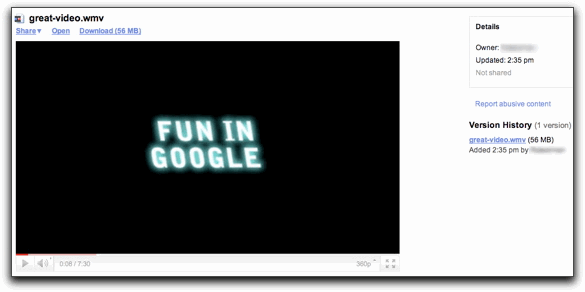 On the page that opens, you can also find additional information about the file, including the owner, whether the file is shared or not, and when the file was uploaded. You can also download previous versions of the file, but you can’t view these versions in the player. If you'd like to play one of the older versions, you need to delete the more recent versions and wait for it to be processed.
Error messages
Below are some error messages you might see while trying to watch an uploaded video, and some possible solutions.
| The video is not yet processed. | Please try opening the file again later. |
| Unable to process this video. | The video file might be corrupted, or the video has been uploaded in a format that doesn't work with the player. Please either choose a different format or try uploading the video again. |
Sunday, January 2, 2011
Top 10 Gmail Labs You Must Enable
 As if Gmail wasn’t powerful enough, you can find all sorts of goodies and extra features in Gmail Labs. The list is pretty massive, so we’ve narrowed down our 10 favourite labs to help increase your email productivity.
We’ve actually gone through our 10 favourite labs before, back when Labs was a bit younger. Now, many of those features are part of Gmail itself, so we’ve decided to revisit the labs and see what else Gmail has cooked up. To access these features in Gmail, just hit the green flask icon next to “Settings” in the Gmail web interface.
10. Undo Send
 We’ve all been there: you spend half an hour writing a strongly worded letter, hit send, and realise you probably shouldn’t have done that. Thankfully, Gmail Labs’ Undo Send feature is thereto save you from yourself. After sending an email, Gmail will wait a predefined number of seconds (5, 10, 20, or 30, configurable in Gmail’s settings) before sending—at any point during which you can hit the “undo” button to take back your mistake. Even if you don’t foresee needing it, it’s a heck of a lot better than yanking out your Ethernet cable, so you might as well keep it around just in case.
9. Advanced IMAP Controls
 If you like Gmail but use a separate mail client like Thunderbird or Mail.app to access it, you’ve probably had a bit of confusion with Gmail’s IMAP implementation. Labels are now folders, some folders you didn’t even know existed, and there are multiple copies of messages everywhere. If you access Gmail via IMAP, you’ll definitely want to enable Advanced IMAP controls, which let you select which labels actually show up in your mail client. Once enabled, you can access its settings from the Labels tab of Gmail’s settings. Even if you don’t regularly use a mail client to get your mail, it’s pretty useful to have it ready when Gmail goes down for awhile.